Daily Health
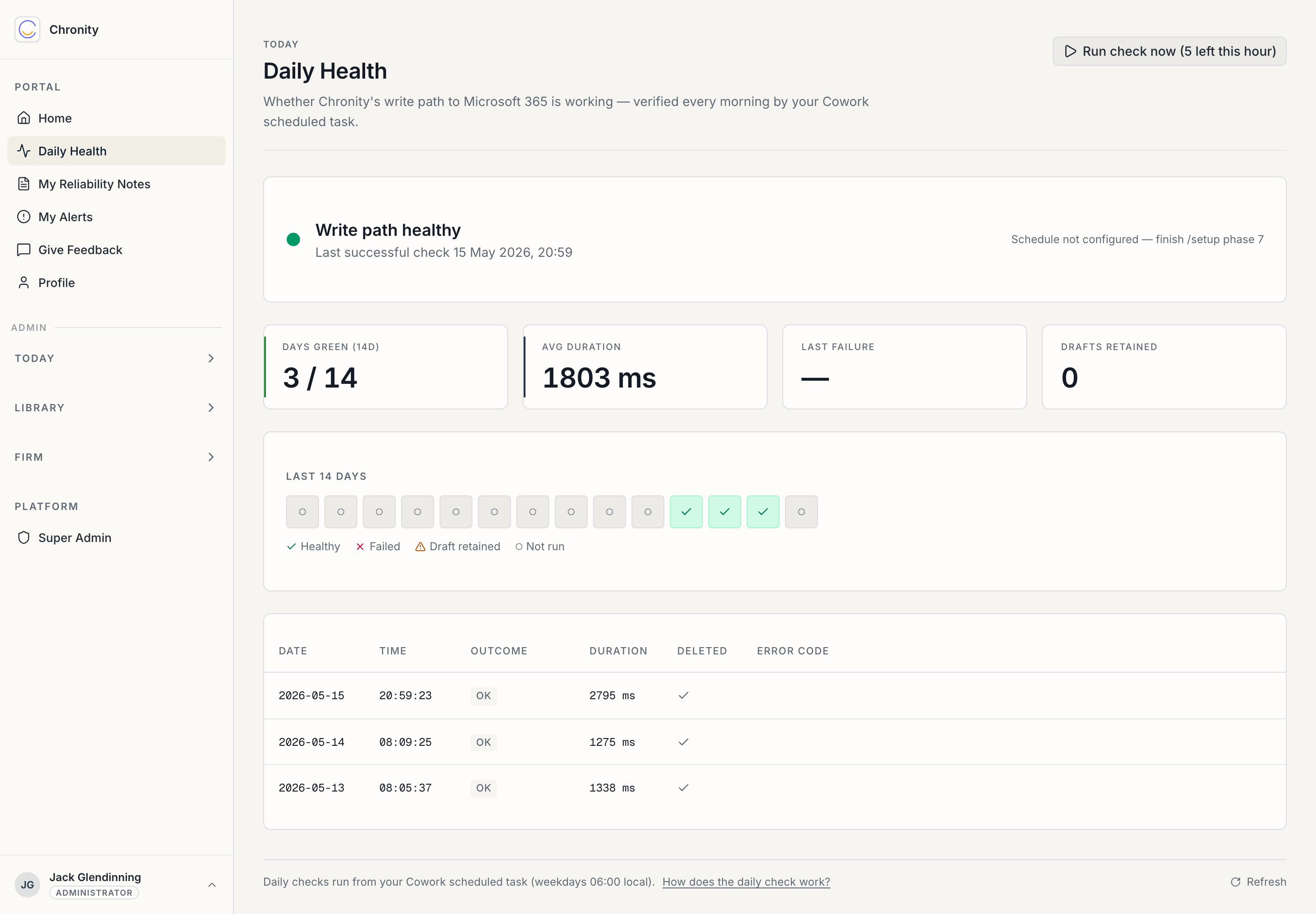
Daily Health answers one narrow question: is Chronity's write path to Microsoft 365 still working? It's the third of three independent health signals (the others run invisibly), and it's the only one with a page you'd ever look at.
Why this exists
The RICS audit trail is only worth anything if it's actually being written. The nightmare is a connection that quietly breaks — Claude keeps answering you, no error appears, and the record silently stops. The Daily Check is the guard against exactly that: every weekday morning a scheduled task creates and immediately deletes a throwaway draft, proving the whole write path works end to end. Nothing is ever left in your Drafts folder.
Reading the page
Status banner. "Write path healthy" and the time of the last successful check. This is the headline — if it's green, you can stop reading.
The four figures.
- Days green (14d) — how many of the last fourteen days had a healthy check.
- Avg duration — how long the probe took, in milliseconds. A useful early warning: a creeping number can mean Microsoft 365 is getting slow before it actually fails.
- Last failure — when, if ever, a check last failed. A dash means it never has.
- Drafts retained — how many times the probe created a draft but couldn't delete it (it should be zero; anything else is a tidy-up flag, not a compliance failure).
Last 14 days. A strip of dots — healthy, failed, draft-retained, or not-run — so you can see a pattern at a glance.
The table. Each recent check: date, time, outcome, duration, whether the draft was deleted, and an error code if it failed.
What you can do here
- Run check now. A button to run the probe immediately (rate-limited — a few per hour). Useful if you've just fixed a connection and want to confirm it.
- Refresh. Re-pulls the latest results.
If it's not green
A single missed day is usually nothing — you might have been on leave, or Microsoft 365 had a blip. A run of red is worth acting on:
- Re-open your Claude connection (see Getting connected) and check the scheduled task still exists and is enabled.
- Run Run check now and watch the result.
- If it still fails, tell your admin — and don't worry about chasing it further. Chronity also alerts your firm's admin automatically when a user who normally has healthy checks goes quiet for 48 hours, so you're not the only safety net.
Next: Your reliability notes.