The MIA & use-case taxonomy¶
This is the foundation. Your firm's Material Impact Assessment — the document the RICS Standard requires — lives in Chronity as a taxonomy: a version-controlled list of the AI use cases your firm recognises, each one telling the system how to treat work that matches it. Nothing classifies meaningfully until this is signed, so this is the first thing you do and the thing you keep current.
Find it at Library → Taxonomy.
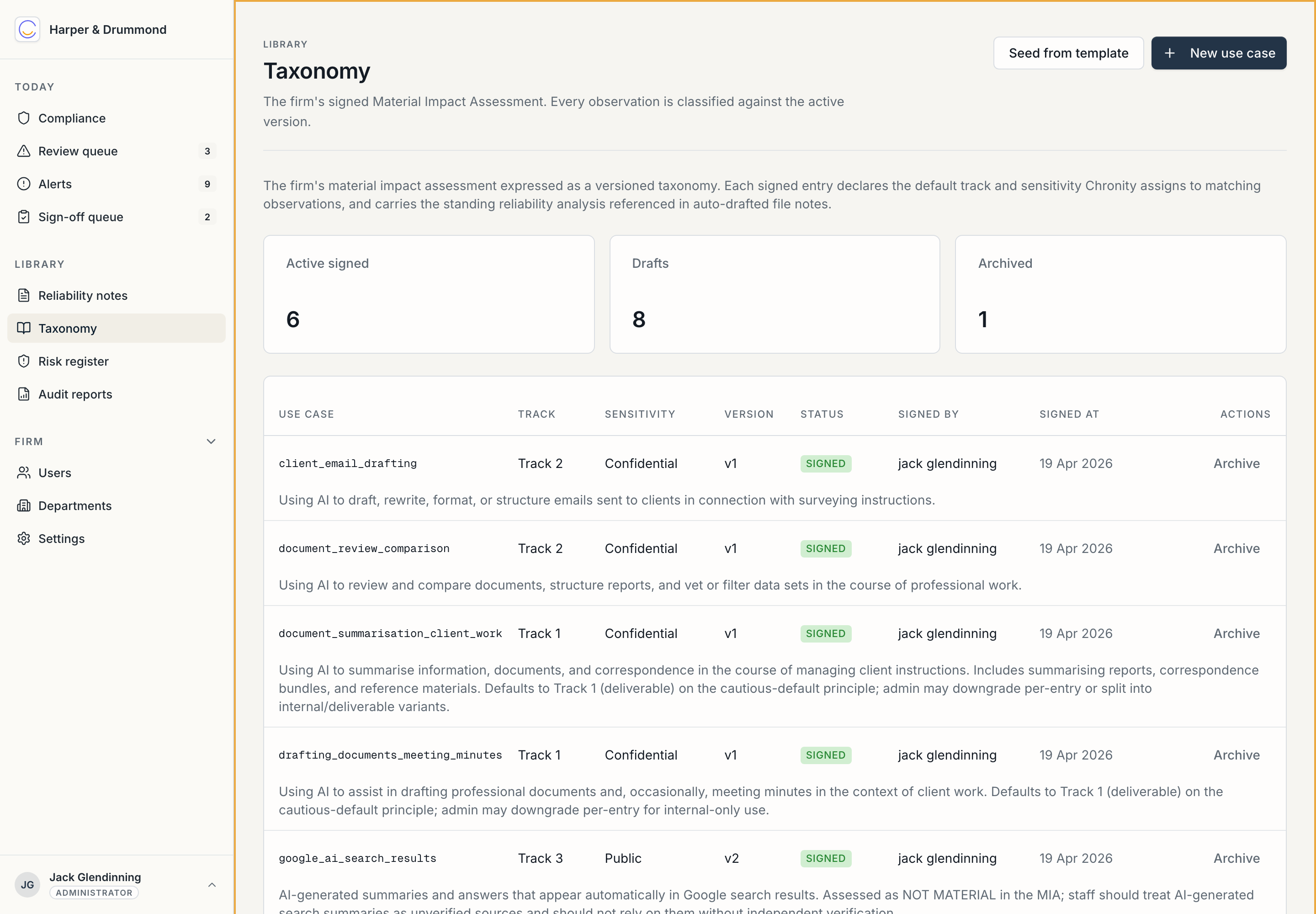
How to read the page¶
The cards at the top count where the taxonomy stands: Active signed, Drafts, and Archived. Below is the list of use cases. Each row is one use case with its track, sensitivity, version, status (Signed / Draft), who signed it and when, and a short description. The example firm has six signed use cases live, eight in draft, and one archived.
What a use case holds¶
Each use case is one entry in your MIA. It carries:
| Field | What it does |
|---|---|
| Use case | A stable name — client_email_drafting, rent_review_cross_checking, document_summarisation_deliverable, and so on. |
| Description | Plain-English definition of what work this covers. |
| Default track | 1, 2, or 3 — the sign-off route work matching this use case takes. This is your professional judgement about materiality, written down. |
| Default sensitivity | public / internal / confidential / restricted. |
| Standing reliability analysis | A reusable block — assumptions, known reliability concerns (with severity), standard mitigations, conclusion. This is what the auto-drafted reliability note quotes by reference. |
| MIA section reference | A cross-reference (e.g. MIA §4.7) so the file note points back to the source document. |
The crucial idea: the AI only recognises which use case applies. Your signed taxonomy decides what that means — the track, the sensitivity, the standing analysis. Classification authority rests with a document you signed, never with the model. That is the heart of the firm's defensibility argument.
Getting started — seed from a template¶
You don't start from a blank page. Seed from template loads a starter surveying taxonomy — the bundled RICS surveying template ships eighteen use cases: twelve material ones spanning letting particulars, lease-clause interpretation, rent-review cross-checking, document summarisation and review, research, client email drafting, document and meeting-minute drafting, spreadsheet work, and terminology clarification; plus six deliberately non-material (Track 3) entries for platform plumbing and routine lookups, which keep the supervisor review queue free of noise.
Seed it, then go through every single use case and make it your firm's:
- Is the track right for how your practice actually works? If your firm treats rent-review cross-checking as a formal deliverable, make it Track 1 even if the template says Track 2. This is the judgement only you can make.
- Is the standing analysis honest about the reliability concerns your clients would care about?
- Does every kind of material AI work your firm does have a use case? If not, add one (New use case).
Keeping it current¶
A taxonomy is not set-and-forget. As the firm's AI use evolves — a new kind of work, a new tool, a concern surfaced by an alert or a recurring override — add or revise use cases. Every change is versioned (next page), so the audit trail shows not just what the MIA says but how it has evolved and who decided.
Until it's signed, it isn't authoritative
A draft taxonomy doesn't carry the weight of a signed MIA. Get the first version reviewed and signed before the firm relies on the classification — see Signing & version history.
Next: Signing & version history.